Publish
Publish
Authors
Description
Learn about Bullet page structure right in Notion. Simple and easy to get started.
Slug
bullet-page-structure
The templates in Bullet come with a standard page structure that you can use to add Meta tags and Meta Descriptions easily.
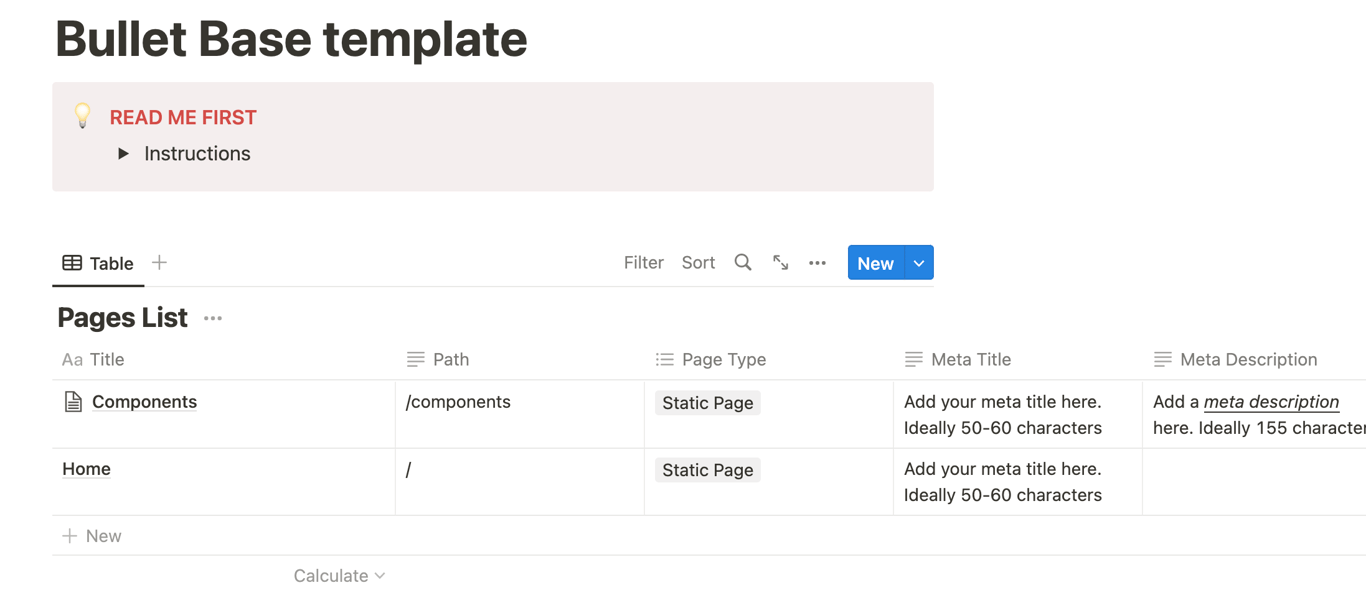
Unlike other site builders, Bullet helps you manage all the url paths, SEO meta description, and SEO meta keywords within Notion.
List of properties for each page:
Path: Mention the full relative path of the page.
Publish: If checeked, the page w3ill be publihsed, else it won’t be published.
Meta Title: Appears in the <title> tag. If empty, page title will be taken as the meta title.
Meta Description: Appears in the meta description of the html page.
Meta Keywords: Appears in the meta keywords section of your html.
Page Type: By default all the pages you create are of “Static Page”.
There are other special page types such as “Blog” and “Knowledge Base”, which will add special characteristics to the pages when rendered. For example, if you choose Blog, RSS feeds will be added automatically.